Arrays
In C language, arrays are reffered to as structured data types. An array is defined as finite ordered collection of homogenous data, stored in contiguous memory locations.
Here the words,
- finite means data range must be defined.
- ordered means data must be stored in continuous memory addresses.
- homogenous means data must be of similar data type.
where arrays are used
- to store list of Employee or Student names,
- to store marks of students,
- or to store list of numbers or characters etc.
Since arrays provide an easy way to represent data, it is classified amongst the data structures in C.
Other data structures in c are structure, lists, queues, trees etc. Array can be used to represent
not only simple list of data but also table of data in two or three dimensions.
Declaring an Array
Like any other variable, arrays must be declared before they are used. General form of array declaration is,
Syntax to declare an array:
data-type variable-name[size];
int arr[6];
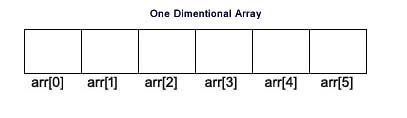
Here int is the data type, arr is the name of the array and 6 is the size of array. It means array arr can only contain 6 elements of int type.
Index of an array starts from 0 to size-1 i.e first element of arr array will be stored at arr[0] address and the last element will occupy arr[9].
Initialization of an Array
After an array is declared it must be initialized. Otherwise, it will contain garbage value(any random value).
An array can be initialized at either compile time or at runtime
Compile time Array initialization
Compile time initialization of array elements is same as ordinary variable initialization. The general form of initialization of array is,
data-type array-name[size] = {list of values};
Here are example:
int marks[5] = {89, 67, 98, 78, 52};
One important thing to remember is that when you will give more initializer(array elements)
than the declared array size than the compiler will give an error.
int marks[5] = {89, 67, 98, 78, 52, 56}; //Compile Time Error
Example Program
#include <stdio.h>
{
int marks[5] = {89, 67, 98, 78, 52};
int i;
for(i = 0; i < 5; i++)
{
printf("%d\n", marks[i]);
}
Output:
89
67
98
78
52
Runtime Array initialization
An array can also be initialized at runtime using scanf() function.
This approach is usually used for initializing large arrays, or to initialize arrays with user specified values.
Example program
#include <stdio.h>
{
int marks[5];
int i;
for(i = 0; i < 5; i++)
{
scanf("%d", &marks[i]);
}
for(i = 0; i < 5; i++)
{
printf("%d\n", marks[i]);
}
Output:
89
67
98
78
52
Two dimensional Arrays
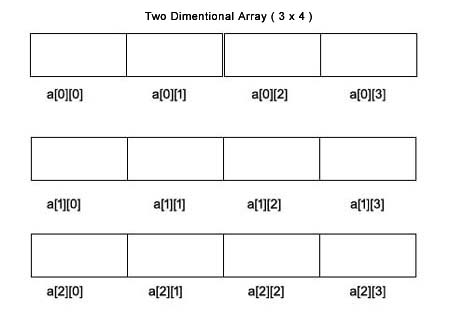
C language supports multidimensional arrays also. The simplest form of a multidimensional array is the two-dimensional array. Both the row's and column's index begins from 0.
Two-dimensional arrays are declared as follows,
data-type array-name[row-size][column-size];
Example
int a[3][4];
#include <stdio.h>
const int ROW = 2;
const int COLUMN = 7;
int main()
{
int arr[ROW][COLUMN];
// Using nested loop to store values in a 2d array
for (int i = 0; i < ROW; ++i)
{
for (int j = 0; j < COLUMN; ++j)
{
printf("ROW %d, COLUMN %d: ", i + 1, j + 1);
scanf("%d", &arr[i][j]);
}
}
printf("\nDisplaying values: \n\n");
// Using nested loop to display vlues of a 2d array
for (int i = 0; i < ROW; ++i)
{
for (int j = 0; j < COLUMN; ++j)
{
printf("ROW %d, COLUMN %d = %d\n", i + 1, j + 1, arr[i][j]);
}
}
return 0;
}
Output
ROW 1, COLUMN 1 : 33
ROW 1, COLUMN 2 : 34
ROW 1, COLUMN 3 : 35
ROW 1, COLUMN 4 : 33
ROW 1, COLUMN 5 : 32
ROW 1, COLUMN 6 : 31
ROW 1, COLUMN 7 : 30
ROW 2, COLUMN 1 : 23
ROW 2, COLUMN 2 : 22
ROW 2, COLUMN 3 : 21
ROW 2, COLUMN 4 : 24
ROW 2, COLUMN 5 : 22
ROW 2, COLUMN 6 : 25
ROW 2, COLUMN 7 : 26
Displaying values:
ROW 1, COLUMN 1 = 33
ROW 1, COLUMN 2 = 34
ROW 1, COLUMN 3 = 35
ROW 1, COLUMN 4 = 33
ROW 1, COLUMN 5 = 32
ROW 1, COLUMN 6 = 31
ROW 1, COLUMN 7 = 30
ROW 2, COLUMN 1 = 23
ROW 2, COLUMN 2 = 22
ROW 2, COLUMN 3 = 21
ROW 2, COLUMN 4 = 24
ROW 2, COLUMN 5 = 22
ROW 2, COLUMN 6 = 25
ROW 2, COLUMN 7 = 26
Example 2: Sum of two matrices
// C program to find the sum of two matrices of order 2*2
#include <stdio.h>
int main()
{
float a[2][2], b[2][2], result[2][2];
// Taking input using nested for loop
printf("Enter elements of 1st matrix\n");
for (int i = 0; i < 2; ++i)
for (int j = 0; j < 2; ++j)
{
printf("Enter a%d%d: ", i + 1, j + 1);
scanf("%f", &a[i][j]);
}
// Taking input using nested for loop
printf("Enter elements of 2nd matrix\n");
for (int i = 0; i < 2; ++i)
for (int j = 0; j < 2; ++j)
{
printf("Enter b%d%d: ", i + 1, j + 1);
scanf("%f", &b[i][j]);
}
// adding corresponding elements of two arrays
for (int i = 0; i < 2; ++i)
for (int j = 0; j < 2; ++j)
{
result[i][j] = a[i][j] + b[i][j];
}
// Displaying the sum
printf("\nSum Of Matrix:");
for (int i = 0; i < 2; ++i)
for (int j = 0; j < 2; ++j)
{
printf("%.1f\t", result[i][j]);
if (j == 1)
printf("\n");
}
return 0;
}
Output:
Enter elements of 1st matrix
Enter a11: 2
Enter a12: 0.5
Enter a21: -1.1
Enter a22: 2
Enter elements of 2nd matrix
Enter b11: 0.2
Enter b12: 0
Enter b21: 0.23
Enter b22: 23
Sum Of Matrix:Example 3: Three-dimensional array
// C Program to store and print 12 values entered by the user
#include
int main()
{
int test[2][3][2];
printf("Enter 12 values: \n");
for (int i = 0; i < 2; ++i)
{
for (int j = 0; j < 3; ++j)
{
for (int k = 0; k < 2; ++k)
{
scanf("%d", &test[i][j][k]);
}
}
}
// Printing values with proper index.
printf("\nDisplaying values:\n");
for (int i = 0; i < 2; ++i)
{
for (int j = 0; j < 3; ++j)
{
for (int k = 0; k < 2; ++k)
{
printf("test[%d][%d][%d] = %d\n", i, j, k, test[i][j][k]);
}
}
}
return 0;
}
Output:
Enter 12 values:
1
2
3
4
5
6
7
8
9
10
11
12
Displaying Values:
test[0][0][0] = 1
test[0][0][1] = 2
test[0][1][0] = 3
test[0][1][1] = 4
test[0][2][0] = 5
test[0][2][1] = 6
test[1][0][0] = 7
test[1][0][1] = 8
test[1][1][0] = 9
test[1][1][1] = 10
test[1][2][0] = 11
test[1][2][1] = 12
String and Character Array
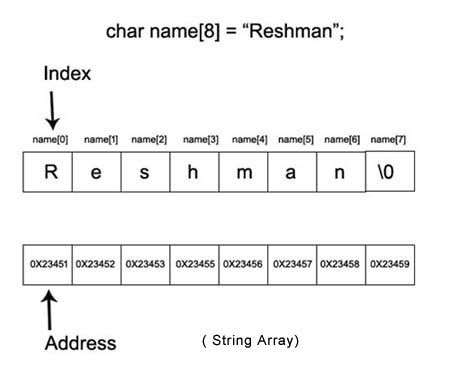
String is a sequence of characters that are treated as a single data item and terminated by a null character '\0'.
Remember that the C language does not support strings as a data type.
A string is actually a one-dimensional array of characters in C language.
These are often used to create meaningful and readable programs.
For example: The string "Reshman" contains 5 characters including the '\0'
character which is automatically added by the compiler at the end of the string.
Declaring and Initializing a string variables
//VALID
char name[7] = "Reshman";
char name[7] = {'R', 'e', 's', 'h', 'm', 'a', 'n'};
//INVALID
char name[5] = "Reshman";
char name[5];
name = {'R', 'e', 's', 'h', 'm', 'a', 'n'};
String Input and Output:
- %s format specifier to read a string input from the terminal.
- But scanf() function, terminates its input on the first white space it encounters.
- edit set conversion code %[..] that can be used to read a line containing a variety of characters, including white spaces.
- The gets() function can also be used to read character string with white spaces.
Example Program for String array
#include <stdio.h>
int main()
{
char stringArray[50];
printf("Enter the String:");
scanf("%[^\n]", &stringArray);
printf(" You Entered %s", stringArray);
return 0;
}
output
Enter the String:Welcome to reshman.online
You Entered Welcome to reshman.online
|